D3 Morpheus is an AI SOC platform that autonomously investigates Microsoft Sentinel alerts by correlating telemetry across Defender, Entra ID, and other Microsoft security tools — completing full L2-depth investigations in under two minutes, 24 hours a day.
If you run a Microsoft-heavy security environment (Sentinel, Defender, Entra, Intune), you have one of the most comprehensive detection stacks available to enterprise security teams. Microsoft has spent years building deep integrations across its security portfolio, and it shows. The visibility you have into your endpoints, identity systems, email, and cloud is genuinely strong.
But there is a gap between detection and resolution. Sentinel identifies the threat. Defender generates the alert. And then, in most SOCs, a human analyst needs to open that alert, investigate what happened, and decide what to do.
That gap — the space between detection and autonomous resolution — is exactly what D3 Morpheus was built to fill.
Key Takeaways: Microsoft Sentinel Automation with Morpheus
Autonomous investigation of every Sentinel alert. Morpheus ingests, correlates, and investigates alerts across the full Microsoft security stack — Sentinel, Defender, Entra ID, Intune — without analyst initiation. Investigations that take an L2 analyst 30–60 minutes complete in under two minutes.
Root cause identification where other tools stop short. In head-to-head benchmark testing against Microsoft Security Copilot across three real-world phishing attack scenarios, Morpheus identified root cause in all three. Security Copilot identified root cause in none.
80% uninvestigated alerts drops to 0%. Most SOCs lack the analyst capacity to investigate every alert. Morpheus runs the investigation automatically, on everything, at L2 depth, around the clock.
Why Do SOC Teams Struggle to Investigate Microsoft Sentinel Alerts?
Here is a scenario that plays out in enterprise SOCs every day. Microsoft Sentinel fires an alert: suspicious forwarding rule created on a user mailbox. That alert is real, the kind of thing that indicates a phishing-driven mailbox compromise. But how serious is it?
To answer that question, an analyst needs to trace the event back: Was the user’s account credential-stuffed? Did they click a phishing link? Has the attacker already moved to other systems? Are there other accounts at risk? Is data being exfiltrated?
That investigation can take 30–60 minutes for an experienced L2 analyst. And it needs to happen for every alert that lands in the queue, including the 80% that arrive when no experienced analyst is on shift, and the alerts that are one of 25,000 arriving that day.
Sentinel is doing its job: detecting the threat and firing the alert. The gap is that the investigation work downstream of that alert has no autonomous engine to run it.
How Does Morpheus Automate Microsoft Sentinel Investigations?
When that forwarding rule alert arrives, Morpheus starts working immediately. It ingests evidence across four separate data sources simultaneously: Defender for Office 365, Entra ID, Defender for Endpoint, and DLP telemetry. It connects the forwarding rule alert back through the credential theft event, traces the browser session to attacker infrastructure, correlates DLP data showing credential transmission, and identifies the original phishing email as root cause. The analyst receives a completed investigation, with every step performed and nothing handed off.
In most cases, this investigation completes in under two minutes. The analyst who opens the alert reviews a completed investigation, ready for decision.
In head-to-head benchmark testing against Microsoft Security Copilot, Morpheus identified root cause in all three real-world phishing attack scenarios. Security Copilot identified root cause in none. The scenarios involved multi-stage attacks across email, endpoint, identity, network, and cloud, precisely the environment most Microsoft enterprise shops are running. Morpheus performed every hard step autonomously and showed its work: every alert ingested, every enrichment run, every link between data sources is visible to the analyst as a full forensic timeline and AI reasoning chain.
What Microsoft Security Integrations Does Morpheus Support?
Morpheus integrates natively with the entire Microsoft Security stack. These are deep, bidirectional integrations that pull telemetry for investigation and write results back where your team works.
Integration
Capability
✓ Microsoft Sentinel
Alert ingestion and bidirectional case sync
✓ Defender for Endpoint
Endpoint telemetry and containment actions
✓ Defender for Identity
Lateral movement and Kerberoasting signals
✓ Defender for Office 365
Phishing detection and email header analysis
✓ Defender for Cloud Apps
OAuth consent and data exfiltration indicators
✓ Microsoft Entra ID
Identity context and privileged access events
✓ Microsoft Intune
Device compliance for endpoint risk scoring
✓ Azure Active Directory
Authentication events and sign-in risk signals
Morpheus also extends beyond Microsoft telemetry, correlating signals from tools like CrowdStrike, SentinelOne, Splunk, Palo Alto, and 800+ others in the same investigation. If your environment is predominantly Microsoft with some third-party tools in the mix, Morpheus handles both sides of that equation in a single workflow.
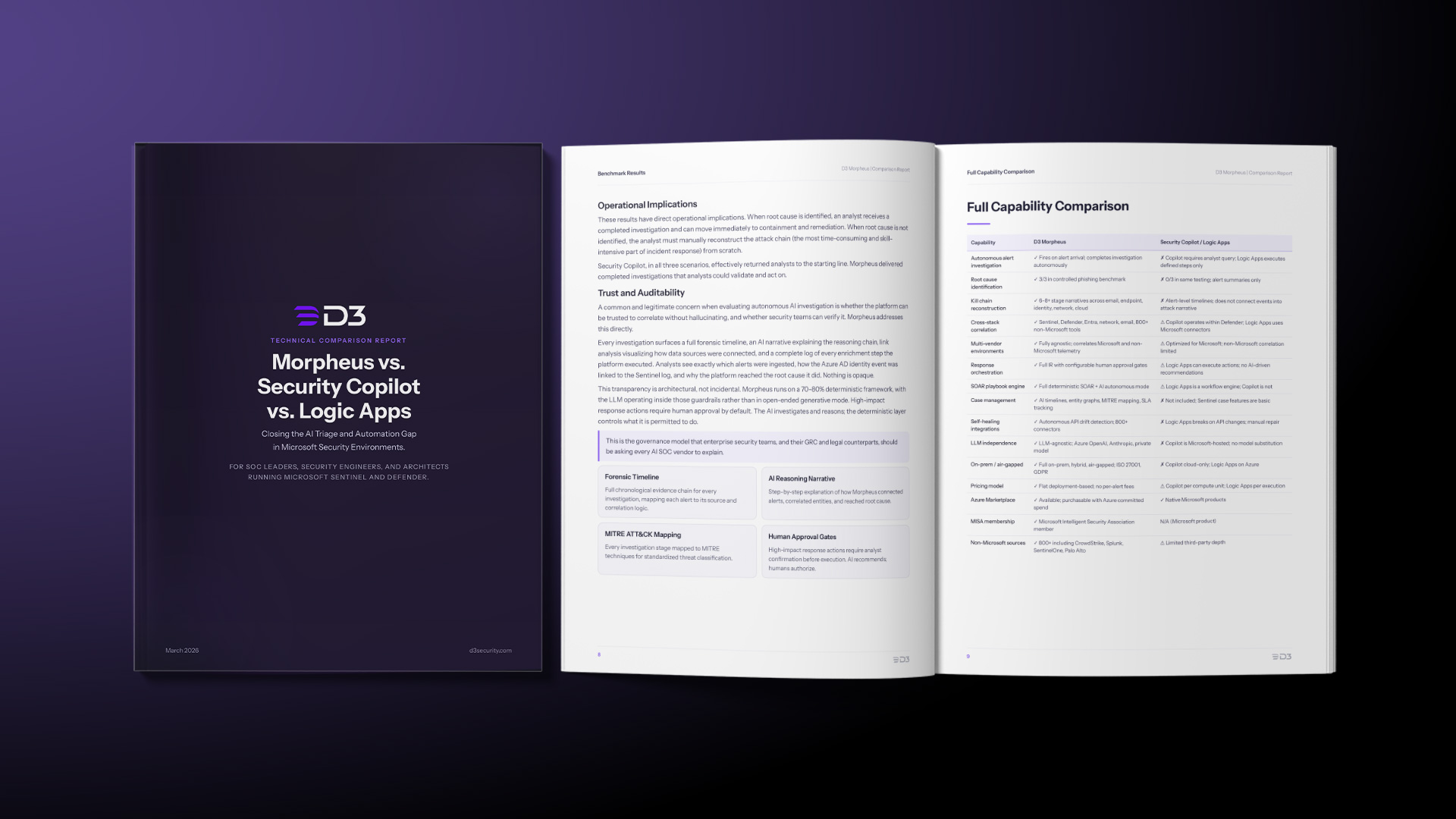
Morpheus vs. Security Copilot vs. Logic Apps: What’s the Difference?
We hear this question often: ‘We already have Logic Apps and Security Copilot, so why do we need Morpheus?’ The honest answer is that these tools serve different purposes.
Security Copilot is an AI assistant. It helps analysts query logs, generate summaries, and explore incident data using natural language. It is analyst-initiated and analyst-directed, meaning it activates only when an analyst engages it. When it does engage, it surfaces leads; connecting those leads into a complete attack narrative is still the analyst’s job. In the Scenario 2 benchmark, Security Copilot correctly identified the forwarding rule as an initial access indicator and stopped there. The correlation to the credential theft, the fraudulent login page, and the originating phishing email went back to the analyst. It is a powerful tool for experienced analysts who have time to use it.
Logic Apps is a workflow automation platform. It can trigger on Sentinel alerts and execute predefined action sequences: creating tickets, sending notifications, running enrichment lookups. It is a capable automation tool for well-defined, stable workflows. The investigative judgments required to determine whether an alert represents a real attack, assess blast radius, or select the right containment action fall outside what Logic Apps was designed for.
Morpheus does what neither does: it autonomously runs the complete investigation, from alert to completed finding, and delivers evidence-backed results that an analyst can act on immediately.
The typical outcome for enterprise Microsoft shops that add Morpheus: Sentinel fires. Morpheus investigates. The analyst reviews a complete investigation report with root cause identified, kill chain traced, and containment recommendation generated, then decides whether to approve the response. The investigation that used to take 30–60 minutes of analyst time is handled in under two minutes, automatically, for every alert.
What Do Security Engineers Get from Morpheus?
Beyond the investigation story, Morpheus changes the operational experience for security engineers running Microsoft environments in two meaningful ways.
Self-Healing Integrations
Microsoft pushes updates constantly. Defender API changes, Sentinel connector updates, Entra schema modifications: these happen regularly, and in a traditional SOAR environment, they break integrations silently. Engineers discover the break hours later when they notice alerts are stalling.
Morpheus monitors every integration continuously and, when it detects API drift or schema change, generates corrective code automatically to restore the connection. The support ticket, the investigation gap, the 3 AM scramble because a Microsoft update broke the CrowdStrike connector you rely on for endpoint context: Morpheus handles all of that before anyone notices.
Single Engineer to Operate
One of the most consistent things we hear from enterprise customers is the contrast between the engineering investment required to run their previous SOAR program and what Morpheus requires. Building Logic Apps workflows, maintaining Sentinel playbooks, and managing AI orchestration across three separate tools is a multi-person engineering job.
Morpheus customers consistently report that the platform can be deployed and maintained by a single engineer. Morpheus generates its own investigation playbooks autonomously, and self-healing integrations eliminate the maintenance labor that normally consumes engineering time.
Can You Purchase Morpheus Through Azure Marketplace?
Yes. For organizations with Microsoft Azure Consumption Commitments (MACC), Morpheus is available on Azure Marketplace and can be purchased using existing Azure committed spend.
This matters because it eliminates the procurement friction that typically accompanies a new security vendor. The existing MACC spend covers it, the purchase runs through your current Azure agreement, and the budget line is already justified. If your organization has MACC spend, Morpheus fits within it.
D3 Security is also a Microsoft Intelligent Security Association (MISA) member, which signals the depth of the Microsoft partnership and the level of integration that underlies it.
Frequently Asked Questions
What is an AI SOC platform?
An AI SOC platform is a security operations tool that uses artificial intelligence to autonomously investigate, triage, and respond to security alerts — without requiring an analyst to initiate or direct each step. Unlike traditional SOAR platforms that depend on predefined playbooks, an AI SOC platform like D3 Morpheus generates its own investigation logic and adapts to each alert dynamically.
How does Morpheus differ from Microsoft Security Copilot?
Security Copilot is an analyst-initiated AI assistant: it activates when an analyst asks a question and surfaces leads for them to follow. Morpheus is fully autonomous — it investigates every Sentinel alert the moment it fires, correlates evidence across Defender, Entra ID, and other sources, identifies root cause, and delivers a completed investigation to the analyst. In benchmark testing across three real-world phishing scenarios, Morpheus identified root cause in all three; Security Copilot identified root cause in none.
Does Morpheus work with non-Microsoft security tools?
Yes. While Morpheus integrates deeply with the full Microsoft security stack (Sentinel, Defender, Entra ID, Intune), it also correlates signals from 800+ other tools — including CrowdStrike, SentinelOne, Splunk, and Palo Alto — within the same investigation. Most enterprise environments run a mix, and Morpheus handles both sides in a single workflow.
How long does a Morpheus investigation take?
Most investigations complete in under two minutes. An investigation that would take an experienced L2 analyst 30–60 minutes — tracing a Sentinel alert back through credential theft, phishing emails, lateral movement, and data exfiltration — is handled autonomously and delivered as a completed report with root cause, kill chain, and containment recommendations.
What percentage of alerts does Morpheus investigate?
100%. Most SOCs leave roughly 80% of alerts uninvestigated due to analyst capacity constraints. Morpheus investigates every alert that Sentinel fires, at L2 depth, 24 hours a day — bringing that uninvestigated number from 80% down to zero.
Who Should Read This, and Why It Matters Now
The enterprise security automation market is moving fast. A year ago, ‘AI SOC’ was a category most buyers were approaching with justified skepticism. Today, autonomous investigation is a real, demonstrated capability, though delivery varies across platforms.
For Microsoft shops, the evaluation question is specific: you already have strong detection. The question is what investigates the detections, at what depth, and at what speed. The 80% of alerts that go uninvestigated in most SOCs stay that way because there simply are too few analysts to open all of them.
Morpheus changes that number from 80% uninvestigated to 0%, running the investigation automatically, on everything, at L2 depth, 24 hours a day.
If you are a SOC leader, security architect, or CISO running a Microsoft-heavy environment and wondering what closes that gap, Morpheus is the platform designed specifically to answer that question.
See Morpheus in Your Microsoft Environment Book a live demonstration using alerts representative of your Sentinel and Defender environment. We will show you Attack Path Discovery running on real Microsoft telemetry and what autonomous L2 investigation looks like in under two minutes.
Shriram Sharma
Shriram Sharma is a Web Content Developer at D3. A former journalist, he chronicled high-profile data breaches, cyber-attacks, and conducted interviews with white and grey hat hackers. He likes to share his fascination for the field of cyber security by creating accessible and engaging content.
Learn More About Morpheus
Check out these resources to answer your questions about our other cutting-edge capabilities.
Uncover how Morpheus’s AI-driven investigation capabilities transform alert handling from hours to seconds while keeping humans strategically positioned.
Stop investigating alerts in isolation. A technical guide to Attack Path Discovery, separating vertical privilege escalation from horizontal lateral movement using specialized LLMs.
SOC teams keep asking how the AI SOC differs from traditional SOAR. Here’s what Morpheus does differently—from integration maintenance to false negatives.